![MGID_Logo_Help_Center_W_R_Swoosh.svg]](https://help.mgid.com/hubfs/MGID_Logo_Help_Center_W_R_Swoosh.svg)
MGID Settings
1. In the MGID dashboard, to begin the process of setting up campaign tracking, click Create and then Campaign.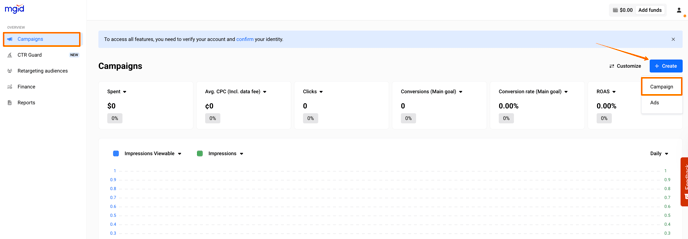
2. After filling out the Campaign setup and the Budget and limits sections, proceed to the Conversion tracking section. Then, click Webhook./Advertisers/1.%20English%20language%20articles/Webhooks%20updated/1.%20Webhook_new.png?width=688&height=363&name=1.%20Webhook_new.png)
3. Name your conversion goal (e.g., "order"). To track multiple goals, simply repeat this step for each new goal./Advertisers/1.%20English%20language%20articles/Webhooks%20updated/2.%20Webhook_new.png?width=688&height=332&name=2.%20Webhook_new.png)
4. From the dropdown list of third-party platforms (vendors), choose Cartpanda.
/Advertisers/1.%20English%20language%20articles/Cartpanda%20via%20webhooks/Cartpanda.png?width=688&height=362&name=Cartpanda.png)
The click_id parameter is automatically included in the tracking tags, so no manual edits are required.
5. Click the Get webhook URL button to generate your unique webhook link. Copy the provided URL – this is the endpoint to be configured on the vendor’s side.
/Advertisers/1.%20English%20language%20articles/Webhooks%20updated/5.%20Webhook_new.png?width=688&height=350&name=5.%20Webhook_new.png)
/Advertisers/1.%20English%20language%20articles/Braip.com/Braip-webhook_1.png?width=688&height=355&name=Braip-webhook_1.png)
6. If you're editing an existing campaign, hit Save Changes. For new campaigns, select Publish to go live.
7. Complete the Integration on the vendor’s side. Use the generated webhook URL to configure tracking within the selected vendor's platform.
Cartpanda Settings
1. In the Cartpanda admin page, go to Notificaçōes (Notifications) and proceed to the Webhooks section.
/Advertisers/1.%20English%20language%20articles/Cartpanda%20via%20webhooks/NEW_cartpanda1.png?width=688&height=387&name=NEW_cartpanda1.png)
/Advertisers/1.%20English%20language%20articles/Cartpanda%20via%20webhooks/NEW_cartpanda2.png?width=688&height=393&name=NEW_cartpanda2.png)
2. Select Criar Webhook.
/Advertisers/1.%20English%20language%20articles/Cartpanda%20via%20webhooks/NEW_cartpanda3.png?width=688&height=391&name=NEW_cartpanda3.png)
Event 1: Pedido pago
Endpoint: https://a.mgid.com/postback/webhook?e=webhook_main&vendor=cartpanda
/Advertisers/1.%20English%20language%20articles/Cartpanda%20via%20webhooks/NEW_cartpanda4.png?width=688&height=351&name=NEW_cartpanda4.png)
Then, press Salvar webhook (Save webhook).
For additional events, repeat Step 2. Below is an example of configured events.
- Event 2: Pedido criado
Endpoint:
https://a.mgid.com/postback/webhook?e=webhook_additional1&vendor=cartpanda
- Event 3: Carrinho abandonado
Endpoint:
https://a.mgid.com/postback/webhook?e=webhook_additional2&vendor=cartpanda
Lastly, contact your manager to perform test conversions and confirm that tracking set up was successful.